Skip to content
Hyperfluid 2.0 is live console.hyperfluid.cloud
Data Access

Data Product APIs

Query every table over SQL, GraphQL, REST, MCP and search: one endpoint per protocol

Publish your tables as data products and plug in your BI tools, applications and AI agents: Claude and enterprise copilots connect natively over MCP. Catalog, quality, metrics and consumption, everything is managed from the console.
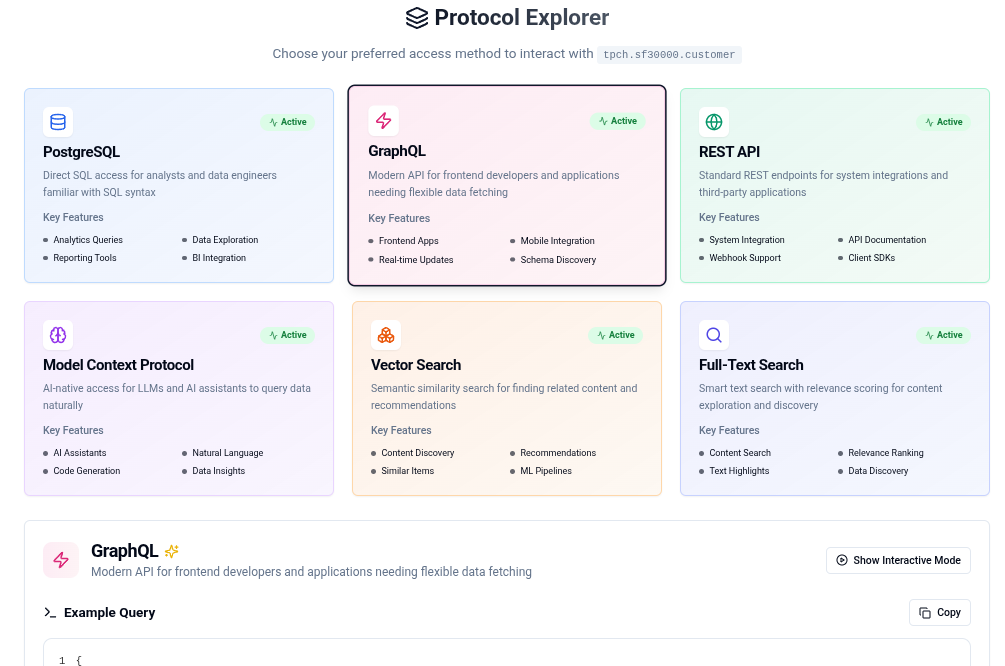
Hyperfluid console: Data APIs, data product catalog and access protocols

Specifications

SQL
PostgreSQL protocol, simple and prepared queries
GraphQL
Generated schema, GraphiQL playground
REST / OpenAPI
Generated endpoints, built-in Swagger
MCP
URL and token provided by the console
Search
Full-text, BM25 scoring
Authentication
Bearer token, service account rights

Use cases

AI agents and copilots

Plug Claude and your enterprise copilots into your tables over MCP

Native MCP protocol

Modern web applications

GraphQL integration for reactive interfaces

Typed GraphQL queries

Analytics and BI

PostgreSQL connection for your existing tools

Compatible with Tableau, Power BI, DBeaver, DataGrip

In action

The AI agent plugged into your data

A business team connects an AI agent to its tables over MCP

  1. Get the data product's MCP configuration from the console, with its URL and token
  2. Declare it in Claude, in an agentic IDE or in the enterprise copilot
  3. The agent lists the data products, catalogs, schemas and tables its token grants access to
  4. It then queries a table, choosing its columns, a filter and a maximum number of rows

An AI agent plugged into real data, confined to the scope its token allows

The developer who waits for no one

A frontend developer wants to display sales data in an application

  1. Open the data product in the console and select the GraphQL protocol
  2. Test the generated query in the built-in GraphiQL playground
  3. Copy the JavaScript or Python integration snippet shown next to the query
  4. Ship to production on the same endpoint, with a dedicated service account

The feature ships without going through an integration team

The BI analyst who keeps their tools

A BI analyst connects Tableau to Hyperfluid over the PostgreSQL protocol

  1. Get the PostgreSQL connection details from the console: host, port, database and token
  2. Enter them in Tableau, Power BI or DBeaver as a standard PostgreSQL source
  3. Build the dashboard from the tables exposed in the catalog
  4. Queries hit the tables directly, with no intermediate copy

A BI dashboard connected to the catalog, with no extra ETL pipeline

5 protocols, one source

MCP
Model Context Protocol: plug Claude, your AI agents and your enterprise copilots straight into your tables, with access rights specific to each token.
PostgreSQL
Connect your usual SQL tools over the PostgreSQL protocol: psql, DBeaver, DataGrip, Tableau, Power BI.
REST / OpenAPI
Endpoints generated from the schema, documented and explorable from the built-in Swagger UI.
GraphQL
Flexible queries for your modern frontend applications, with a GraphiQL playground in the console.
Full-text Search
Text search across your tables, BM25 scoring, index built on demand or pre-computed.

Governed, observable data products

Every data product is managed from the console, from publication to consumption tracking.

Catalog

All your tables published as data products, ready to consume.

Search

Find the right data product through catalog search.

Quality

Keep an eye on the reliability of each data product.

Metrics

Measure the activity of your data products.

Consumption

See who consumes your data, over which protocol and from which account.

Key benefits

  • Five protocols, one endpoint per protocol, a single source
  • Native MCP for your AI agents and enterprise copilots
  • Quality, metrics and consumption tracked in the console
  • Every access goes through a token, carrying the rights of the service account behind it

Ready to connect your applications?

Discover how Data Product APIs power your applications and AI agents.